HOW TO POSTS: LIGHTING AND COMPOSITION
5 Best websites for digital photo software reviews in 2023
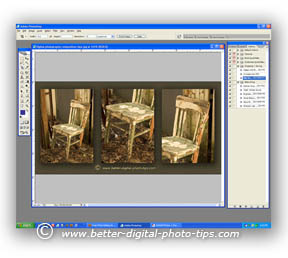
Reading the many digital photo software reviews on different web sites can be very time-consuming.
There are so many photography software review sites that it could take you months to figure out what software editing program is best for you. It's best to read the reviews from actual consumers and Amazon is one of the kings of online software reviews.
After I did extensive research, these are these are the finalists. Here's the list of top articles for digital photo editing software reviews:
- PCmag Comparison type of review of the different options for editing your digital photos. Simplified chart comparing 14 different editing options.
- B+H Photo/Video. How to pick photo editing software. Article covering 8 different photo editing programs, some of which you've probably never heard of.
- Toptenreviews.com Best photo editing software 2021. Reviews of the most popular programs, tested and reviewed by actual bonafide photographers. Detailed post.
- Digitaltrends.com. Best free photo editing software. A look at 7 excellent choices for digital photo editing software programs that are free.
- Mashable.com. Photography Editing software for your desktop computer or for your laptop computer. This article limits the reviews to just 6 different programs to improve your images, two of which are free.
- PhotoLemur. Best Photo Editing Software. This is a list of 11 photo editing software programs and a short review of each.
- Skylum. Best free photo editing software reviews. There are 13 "Free" software programs reviewed, but several of these zero-cost offerings are really just trial versions with a limited time of use before you'd have to pay for the paid version.
- Tom's Guide. Best photo editing software in 2021. This post covers 8 different choices for editing your digital photos. Tom's guide is a large website, covering lots of various articles on electronics. not just geared toward photography.
- g2. Best Photo Editing Software in 2021. Compare Reviews on 100+. The actual content in this article is quite thin. It's more of a collection of links to tabulated reviews giving grades of 1 to 5 stars.
- Digital Camera World. Buying guide of the best photo editing software. This post lists 10 options for digital photo editing. Each review is about two paragraphs long.
My personal photo Software Reviews
1. adobe photoshop cs is now creative cloud
Like other software companies, Adobe offers Photoshop on a subscription basis. It's part of the "Creative Cloud" which includes the popular Photoshop Bridge, Camera RAW, and Lightroom, with a bout half a dozen other graphic related apps.
I don't recommend Photoshop to the readers of this photography blog because of its' monthly payment and because of it's complexity. - Bruce Lovelace, Better-Digital-Photo-tips.com
Photoshop Elements is a much better choice for you.
As an Amazon affiliate I receive a small commission from qualifying purchases, at NO added cost to you.
Formerly offered as Photoshop CS stands for Creative Suite and means this bundled software includes photo and video editing, graphic design, and web development applications.
I've been a Photoshop user since it's early windows version in the mid-1990s. Each new release adds extra features and power.
Photoshop cs5 was released in April of 2010. The cs5 version had upgraded it's frequently used Tools, has more natural looking painting and great HDR, High Dynamic Range capabilities.
It's most amazing feature is called Content-Aware Fill. You can replace a distracting element in your background with a natural looking replacement that matches.
This one feature alone can make the average photographer capable of producing great digital photos. It works amazingly well in most situations and sure beats the time-consuming use of the clone tool.
2. adobe photoshop elements
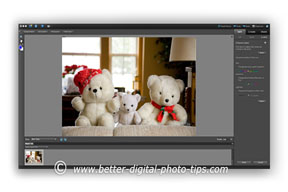
For those that don't quite need the complexity of Adobe Photoshop CS or Creative Cloud, the Photoshop Elements series is a great choice for most photographers.
Photoshop Elements 9 was released in September of 2010. It has two programs combined into one. It has the photo editor as well as an organizer.
It also lets you upload directly to Facebook and has a real cool People Recognition feature. There are the standard AutoFix tools in the organizer section that can take care of color, red-eye and contrast and other basic retouching.
You can use a brush tool to adjust certain areas of your photo with a variety of effects. In today's world, it's all about sharing. With the explosion of communication channels such as the internet, texting, emailing, Facebook, twittering and blogging, our society shares more than ever before.
Photoshop Elements software lets you easily share photos in a variety of ways, including web-TV, iPhone photos and emailing. The email option has frames and an address book.
You can print single prints, packages or contact sheets. The Slide-show feature lets you add your music or your voice. Clip art, frames and custom text can be added. You can do a photo share by creating books, scrapbook pages, labels for DVD, holiday cards or calendars.
3. adobe photoshop lightroom
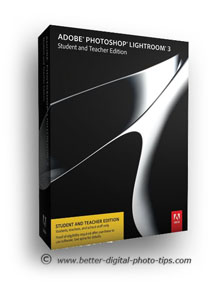
Adobe Photoshop-Lightroom 3 was released in 2010. That was a long time ago. This is photography editing software that is designed for professionals, but is really great for hobbyists and amateurs too. It's all about time and work flow.
Lightroom 3 made the process of adjusting large batches of photos quick and simple. It does take some effort to learn the software initially, but it's well worth attacking the learning curve.
It has five, full-featured modules: Library, Develop, Slideshow, Print, and Web
1. LIBRARY. The library module gives you a fast way to name, organize, label, filter your photos in a variety of ways. It has a few compare modes that are a great help to narrow down the number of photo you want to use..
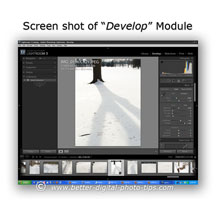
2.DEVELOP. The Develop module is where I am most excited about the newest version of Lightroom.
You can apply adjustments to exposure, brightness, contrast, color, tint, sharpness and more to a few selected or all of the photos in your file. The Noise Reduction capabilities are amazing.
3. SLIDESHOW. Slideshow module, as the name implies, let's you create slide shows with whatever photos you select. It has a large number of options such as: borders, shadows, background choice, watermarks, copyright, overlays and lots of ways to control each one the options. You can add music or other audio clips as well.
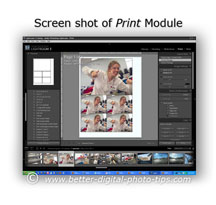
4. and 5. PRINT and WEB Modules. The Print and Web modules speed up producing your final output, printing or putting on the web.
This software module has a great preview for printing multiple photos on a single sheet of paper. The updated version has a way to load your photos to Facebook too.
It does take an investment of your time to learn, but it is so worth it my fellow photographers. In addition to digital photo software reviews, please explore other digital photography tips such as photo composition, lighting, posing, exposure and digital camera settings.
A great source for getting specific digital photo software reviews by customers who have purchased a certain software is to use the reviews on Amazon. Read the reviews that have a one star rating first and see if they are well written by a knowledgeable person.
I read a lot of reviews and after a while you can tell if someone has a real legitimate complaint about a product. Some digital photo software reviews on Amazon complain about their purchase and not really about the software.
best source for digital photo software reviews: |
Photography Software Reviews  |
Like it or not, the photography industry has changed and so has the editing software. Thanks to AI, artificial intelligence, the software is so much better at giving you powerful and simple to use, one-click edits to your photos that can make them remarkable.
Make it your goal to enjoy learning your photography editing software!
For related editing software posts, see the links below my signature. To search for any photography topic on this web site use the search box below and scroll down through the results.
Search for a new topic on this site:

ABOUT BRUCE LOVELACE
Bruce is the publisher of this website. He is the author of the book "Improve Your Photography Instantly." Read more on Bruce on his Bio Page. He's been known as The Traveling Photographer ever since 1994. Read more about this website.
View some of Bruce's photos on Instagram. Visit the Facebook Page. Watch him on YouTube. Bruce runs photo workshops for kids and adults, and provides one-on-one photography coaching.
Digital Photography Education Location on Google My Business
You might like these
5 Basic Photo Editing Tips For Beginners. Make Your Photos 10X Better
Easy ways to improve your pictures. These Top 5 photo editing tips for beginners are the ones to do first to turn your average photos into winning photos
3 Digital Photo Editing Steps To Take in 2024 Before Anything Else
Don't retouch your photos until you read this. Before you get bogged down with editing software, save time. Use these 3 digital photo editing tips first
How Professional Photographers Do Digital Photo Editing-For Beginners
Unlock Pro Secrets: A Look Inside a Professional Photographer's Digital Editing Workflow This is how the pro photographers do their digital photo editing.
Recent Articles


-
5 Basic Photo Editing Tips For Beginners. Make Your Photos 10X Better
Mar 28, 24 12:22 PM
 Easy ways to improve your pictures. These Top 5 photo editing tips for beginners are the ones to do first to turn your average photos into winning photos
 -
How Professional Photographers Do Digital Photo Editing-For Beginners
Mar 28, 24 11:47 AM
 Unlock Pro Secrets: A Look Inside a Professional Photographer's Digital Editing Workflow This is how the pro photographers do their digital photo editing.
 -
Definition of Aperture. Why You Need To Know How it Affects Your Photo
Mar 28, 24 11:13 AM
 It affects sharpness and what's in focus. The definition of aperture that digital photographers should be aware of and how it affects your photographs
 -
9 Simple Examples of Depth of Field To Help You To Take Better Photos
Mar 27, 24 10:47 AM
 Check these out examples of depth of field. It's a great way for you to generate ideas for great photos.
 -
No More Blurry Faces! Family Photo Hacks for Sharp & Stunning Photos
Mar 26, 24 08:08 AM
 The right camera settings and a little planning will give you stunning sharp family portraits. Helpful guide to sharp family portraits
 -
How To Do Baby Poses (10 Classic Poses For Babies That You Can Copy
Mar 22, 24 07:17 AM
 Learn heartwarming newborn baby posing. Simple baby poses you can copy. 10 Easy to copy portrait photography poses of babies

Photo by Tina Dawson on Unsplash
GO AHEAD. Read the consumer reviews of software for yourself:
Improve your photography instantly. Get the 2 most important chapters of my photography book for free.

