HOW TO POSTS: LIGHTING AND COMPOSITION
creative photo techniques
 My First Creative Book
Do you want to use a few creative photo techniques to jazz up your photos? This post has been updated and is now published here at Better Digital Photo Tips-creative photography tips.
Once you've gotten a basic understanding of lighting, composition and exposure, you can expand your creativity with photography both in your camera and on your computer.
This post will be a great introduction to ideas on how to be creative with photography software. If you need some inspiration on how to boost your creativity with taking photos, here's a good article for you.
You have a big advantage over me. You're starting your photography at a time when the number of artistic tools at your disposal is tremendous. You are alive at a great time to be interested in photography?
You have a big advantage over me. You're starting your photography at a time when the number of artistic tools at your disposal is tremendous. You are alive at a great time to be interested in photography?
One of the first creative photography techniques I had a lot of fun with when I was just beginning to experiment was multi-exposure. Of course, it was more challenging back then because it involved film and darkroom techniques.
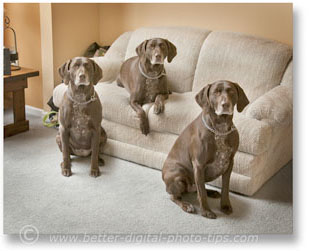
The photo of the dog triplets above was easy to create, once I learned the software. This photograph was created from the three separate photos of the same dog shown below.
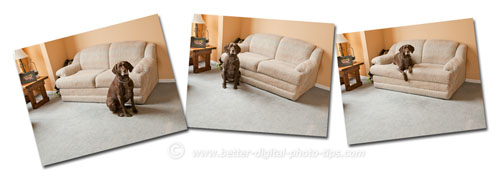 3 separate photos were combined.
It is actually often a simple digital photo editing trick than can be done easily once you learn it and have planned ahead.
To accomplish this effect, you must use a tripod to hold the camera in the exact same spot for every exposure. This will insure that you can combine the photos with no loss in quality or sharpness when you do your photo editing.
In the case of the multiple exposure of the German Shorthaired Pointer, I also needed a couple of dog biscuits to bribe her to stay in each of the locations for the three photos.
You need a tripod and a shutter release or the camera's self-timer to keep your images sharp unless you are using a high shutter speed or flash lighting to avoid camera shake.
I use Adobe Photoshop, but you can also use Gimp, which is similar in capabilities and it's free software. There is also a multi-exposure feature within the "Make a Collage" function of Picasa, but you will get the "ghost" effect when you combine the images.
Essentially you combine your different photos into one by stacking them as layers. You can they reveal or hide any part of any of the layers independently by making them into masks. When you are completely satisfied with you editing, you can "flatten" your layers into one single photograph.
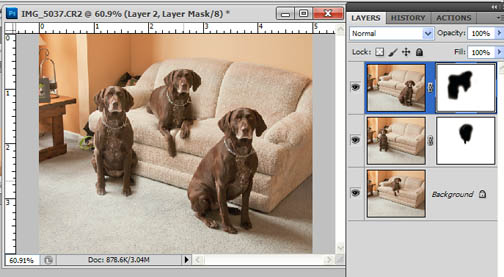
I planned out the 3-dog photography composition ahead of time so that there was plenty of room in between the three spots the dog would occupy in each of the separate photos. That makes it easier to combine them later.
Another one of those creative photo techniques is really just some creative photo editing that I frequently use with nature photography. Again it is done with Adobe Photoshop. Look at the dramatic difference in the two photos below taken in Zion National Park.
creative photo techniques with software
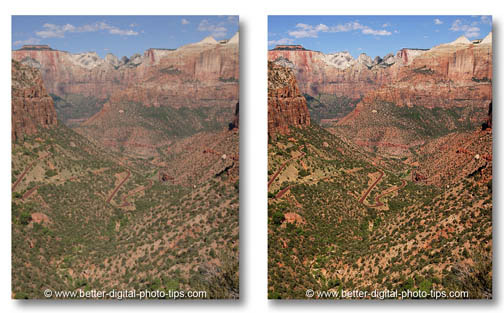
The photo on the right was adjusted using curves in Photoshop. This is an advanced technique used to control contrast. The photo on the right was also sharpened a bit using Unsharp Mask applied to the "lightness" channel only in LAB mode.
It's a unique technique that I use frequently and absolutely love the results I get.
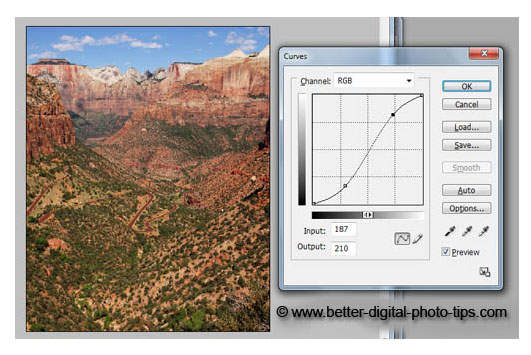
It takes a bit of experimenting to get to your desired result, but my adjustments to the curves often resemble a lazy "S" shape. This shape increases contrast in the shadow areas and the highlight areas, but has little effect on the mid-tones.
Please read my articles on creative photo techniques involving shutter speed, depth of field, composition and lighting, also posted to this Digital Photo Tips web site.
Shoot more photos. Shoot better photos.

ABOUT BRUCE LOVELACE
Bruce is the publisher of this website. He is the author of the book "Improve Your Photography Instantly." Read more on Bruce on his Bio Page. He's been known as The Traveling Photographer ever since 1994. Read more about this website.
View some of Bruce's photos on Instagram. Visit the Facebook Page. Watch him on YouTube. Bruce runs photo workshops for kids and adults, and provides one-on-one photography coaching.
Digital Photography Education Location on Google My Business
Back from Creative Techniques to Digital Photo Editing
How About Taking Some Creative Selfie Photos
Go to Advanced Tips in Photography